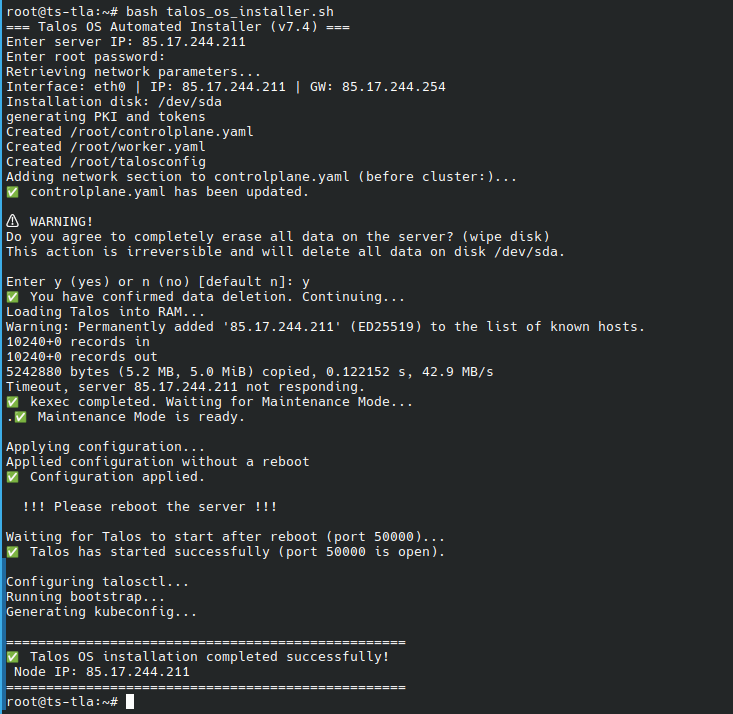
This post shows you how to install Talos OS on a virtual server using the installation script.
For the script to work properly, you need an operating system based on Linux OS or a WSL virtual machine container running on Windows.
Also, the remote server on which you plan to install the OS must already be booted into a rescue image and must have an SSH connection.
If all done, you need to download the script and run it
wget https://screen.unihost.com/ml-post-install/talos_os_installer.sh
bash talos_os_installer.sh
1. Once launched, the script will prompt you to enter the remote server’s address and its root password.
You will then be asked to confirm the deletion of all data from the server. You must enter Y to agree.
2. Once the script has prepared the Talos OS kernel and loaded the configuration file, you will see the message “!!!Please reboot the server!!!”
3. At this point, you need to manually reboot the server using the server management module in your account dashboard.
4. After the system restarts, the script will continue configuring the cluster. All you need to do is wait for the script to finish and start working with the cluster once you see the message “Talos OS installation completed successfully!”